
In this guide
💡 The Short Version: A travel eSIM is a data plan you install on your phone before you fly, so you land at O’Hare or Midway already online, without queuing for a SIM. You need a carrier-unlocked, eSIM-compatible phone. In Chicago you use data for the Ventra app (CTA passes and Metra tickets), CTA Train Tracker and Bus Tracker, Divvy bikes, Uber and Lyft, and maps between the ‘L’ and your hotel. You can tap through the ‘L’ turnstiles with your phone’s wallet without data. Sailyad is the plan we link for the USA.
Why data matters in Chicago
Chicago is a public transport city, and most of the tools for it are on your phone:
- Ventra. The Ventra app sells CTA 1-day, 3-day and 7-day passes and holds your Ventra card balance, and it also sells Metra commuter rail tickets. See our public transport guide for fares and passes.
- Train and bus times. The CTA publishes live arrival times for every ‘L’ station and bus stop (Train Tracker and Bus Tracker), which most maps apps show. In winter, knowing the bus is eight minutes away decides whether you wait at the stop or in a café.
- Divvy bikes. Chicago’s bike share is unlocked and paid for in the Divvy or Lyft app.
- Rideshare. Uber and Lyft pick up at both airports from set zones; see our airport guide.
- Tickets and bookings. River cruise, Skydeck, museum and game tickets usually arrive by email or app, and restaurants in our where to eat guide take bookings online.
Paying fares with your phone
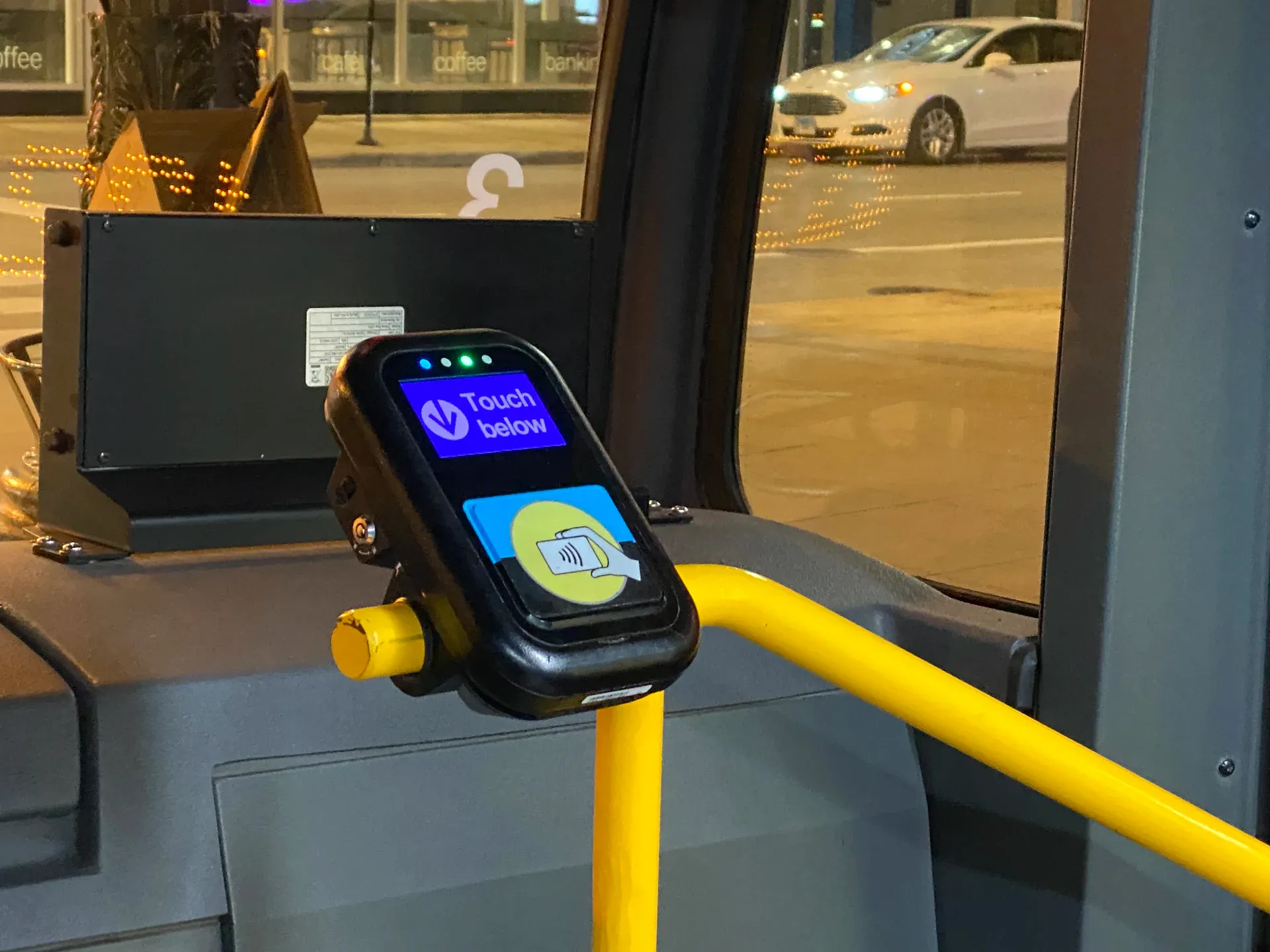
You do not need the Ventra app to ride. Every ‘L’ turnstile and bus reader accepts contactless bank cards and phone wallets, including Apple Pay and Google Pay, and charges the full single fare with free transfers within two hours, according to the CTA. The tap uses your card, so it works whether or not your phone has data. What a contactless card cannot do is hold a pass: the 1-Day, 3-Day and 7-Day passes need a Ventra card, a disposable Ventra ticket or the Ventra app. A pass also boards at O’Hare without the $5 airport fare. Our public transport guide has the details.
eSIM, roaming or a local SIM
| Option | How it works | Good for | Watch |
|---|---|---|---|
| Travel eSIM | A data profile installed on your phone, no physical card | Short stays; online before you land | Needs an unlocked, compatible phone; usually data only |
| Home-carrier roaming | Your own plan and number work abroad | Keeping your number for calls and texts | Check the daily charge before you leave |
| US prepaid SIM | A physical SIM from a US shop | Long stays and a US number | Needs shop time; your phone must be unlocked |
| Wi-Fi only | Hotel, café and museum Wi-Fi | Cost | Nothing between the hotel and your next stop |
An eSIM and your home SIM can sit in the same phone. Keep the home line on for calls and texts if you want to receive them, and switch data roaming off on that line so it does not bill you by accident.
Is your phone ready?
Two checks before you buy:
- Does it support eSIM? Look for “Add eSIM” or “Add cellular plan” in the settings. Recent iPhones, Google Pixels and Samsung Galaxy phones usually do, though models sold in some countries have a physical SIM tray only.
- Is it unlocked? A phone locked to your carrier will refuse a travel eSIM. Ask your carrier to unlock it before you travel.
Installing it
- Buy and install while you have Wi-Fi, before you leave home. Sailyad gives a QR code or an in-app install.
- Leave it switched off, or set it not to be your default line, until you land.
- On arrival switch the eSIM on and enable data roaming for that line only.
- Keep your home SIM as the default for calls, and set mobile data to the eSIM.
If something goes wrong, install it again where there is Wi-Fi; your hotel is the easiest place.

Apps to install before you land
| App | What it does | Needs data? |
|---|---|---|
| Ventra | CTA passes, card top-ups, Metra tickets | Yes |
| A maps app | Routes on the ‘L’ and buses with live CTA times | Yes; download an offline map as a backup |
| Divvy or Lyft | Unlocks and pays for Divvy bikes | Yes |
| Uber and Lyft | Rideshare, including from the airports | Yes |
| Your airline | Boarding passes and gate changes at O’Hare and Midway | Yes |
Metra tickets bought in the Ventra app are shown to the conductor on the train, so make sure the phone has battery on the way back from a day trip such as Oak Park or the Indiana Dunes.
Battery and cold
Phones drain fast in Chicago’s winter. The National Weather Service’s normals at O’Hare give an average January low of 19°F (-7°C), and lithium batteries lose charge quickly in that cold; a phone can shut down while still showing battery left. Keep it in an inside pocket rather than a coat’s outer pocket, carry a power bank, and screenshot tickets and hotel confirmations so you can still show them if the phone dies. Our best time to visit guide has the weather month by month.
Calls, texts and security
- Calls and messages. Travel eSIMs are generally data-only, so use WhatsApp, FaceTime, Messenger or a similar app over the data connection.
- Emergencies. Dial 911 from any phone; it reaches police, fire and ambulance. 311 is the city’s non-emergency number.
- Public Wi-Fi. Avoid banking on an open café or station network; the eSIM gives you a connection you do not share.
- Phone theft. Thieves take phones from café tables and from hands near the doors on the ‘L’. See is Chicago safe?
How much data
A short city break rarely needs a large allowance. Maps with live transit times, rideshare and messaging use little; video calls and uploading photos use the most. Do the heavy uploads on hotel Wi-Fi. Our money guide explains the nightly destination fees many downtown hotels charge.
Checklist
- Unlock the phone and check it supports an eSIM.
- Install the eSIM on Wi-Fi before you leave home.
- Switch roaming off on your home line.
- Install Ventra, a maps app and a rideshare app; add your bank card to your phone’s wallet for the ‘L’.
- Download an offline map of Chicago and screenshot your hotel’s address.
- Read O’Hare and Midway to downtown so you know which train to take when you land.
Roaming charges
Check your home carrier’s daily roaming charge before you rely on it. If it is more than a travel eSIM would cost for the trip, switch the home line’s data roaming off and use the eSIM instead. For the rest of the trip planning, start at the Chicago hub and choose an area with where to stay in Chicago.
Common questions
Do I need an eSIM for Chicago?
You need mobile data for train times, bike hire and rideshare. The Ventra app sells CTA passes and Metra tickets, Divvy bikes are unlocked in an app, and Uber and Lyft are booked in apps. An eSIM, your home carrier's roaming plan or a US SIM all work; an eSIM is usually the cheapest for a short stay.
Does my phone support an eSIM?
Most phones sold in the last few years do, including recent iPhones, Google Pixels and Samsung Galaxy models, but the phone must also be carrier-unlocked. Look in your phone's settings for an option to add an eSIM, and ask your carrier whether the phone is unlocked.
Can I pay for the 'L' with my phone?
Yes. CTA turnstiles and bus readers take contactless cards and phone wallets such as Apple Pay and Google Pay, charging the standard fare. That works without mobile data, but the Ventra app, which sells passes, needs a connection.
Can I use my eSIM to call home?
Travel eSIMs are generally data-only, so you make calls and send messages through apps such as WhatsApp, FaceTime or Messenger over the data connection. Dial 911 in an emergency from any phone.